


[vc_section][vc_row gap=”30″][vc_column width=”1/3″][vc_column_text]
1. Anti-Virus
We recommend Norton 360 Internet Security. Find more information about Norton here.
2. Printer
In the Search Bar on the bottom taskbar of your screen, type in Printers and click on “Printers & Scanners”. Once open, click on Add a printer or scanner. If your printer is on the network, it will show in the list. If it’s plugged in via USB, it should automatically install.
3. Emails & other accounts
If you previously used your emails on your device, please check to make sure you can still access them. Also, make sure you’re still able to access any of your usual websites. For example, Amazon, eBay, Facebook etc.[/vc_column_text][/vc_column][vc_column width=”1/3″][vc_single_image image=”3443″ img_size=”full” alignment=”center” css=”.vc_custom_1720512528364{margin-top: 20px !important;}”][vc_raw_html]JTNDZm9ybSUyMG1ldGhvZCUzRCUyMmdldCUyMiUyMGFjdGlvbiUzRCUyMmh0dHBzJTNBJTJGJTJGd3d3Lmdvb2dsZS5jb20lMkZzZWFyY2glMjIlMjBjbGFzcyUzRCUyMmdvb2dsZSUyMiUzRSUwQSUzQ2lucHV0JTIwdHlwZSUzRCUyMnRleHQlMjIlMjBuYW1lJTNEJTIycSUyMiUyMHNpemUlM0QlMjIzMSUyMiUyMHZhbHVlJTNEJTIyJTIyJTIwcGxhY2Vob2xkZXIlM0QlMjJTZWFyY2glMjBHb29nbGUlMjBvciUyMHR5cGUlMjBhJTIwVVJMJTIyJTNFJTBBJTNDJTJGZm9ybSUzRQ==[/vc_raw_html][vc_row_inner][vc_column_inner width=”1/2″ css=”.vc_custom_1720513328463{padding-bottom: 0px !important;}”][comrepair_section_heading decoration=”decor-2″ css=”.vc_custom_1720513352665{margin-bottom: 0px !important;padding-top: 0px !important;}”]
Review us on Facebook
[/comrepair_section_heading][vc_icon icon_fontawesome=”fa fa-facebook-official” color=”custom” background_style=”boxed” background_color=”white” size=”lg” align=”center” custom_color=”#3b5998″ link=”url:https%3A%2F%2Fwww.facebook.com%2Fhometechcentre%2Freviews||target:%20_blank|”][/vc_column_inner][vc_column_inner width=”1/2″ css=”.vc_custom_1720513324511{padding-top: 0px !important;}”][comrepair_section_heading decoration=”decor-2″ css=”.vc_custom_1720513349033{margin-bottom: 0px !important;padding-top: 0px !important;}”]
Review us on Google
[/comrepair_section_heading][vc_icon icon_fontawesome=”fa fa-google” color=”custom” background_style=”boxed” background_color=”white” size=”lg” align=”center” custom_color=”#dd3333″ link=”url:https%3A%2F%2Fwww.google.com%2Fsearch%3Frlz%3D1C1GCEU_enGB822GB823%26ei%3D8RIKXcnaIdWU8gLXyJDADw%26q%3Dhometech%2Bcentre%26oq%3Dhometech%2Bcentre%26gs_l%3Dpsy-ab.3..35i39l2j0.25075.26657..26730…0.0..0.120.1217.13j2……0….1..gws-wiz…….0i71j0i131j0i67j0i131i67j0i10j0i22i30.nb295MU3Geg%23lrd%3D0x47d8daa5b707c2c3%3A0x46e6155f78eb2cb7%2C3%2C%2C%2C||target:%20_blank|”][/vc_column_inner][/vc_row_inner][vc_column_text]
Useful Links
- HP Smart App – Install your HP Printer
- Epson Support – Install your Epson Printer
- Google Chrome – Most popular web browser
- Steam – Launcher and store for games
- Epic Games – Launcher and store for games
[/vc_column_text][/vc_column][vc_column width=”1/3″][vc_column_text]
No Internet?
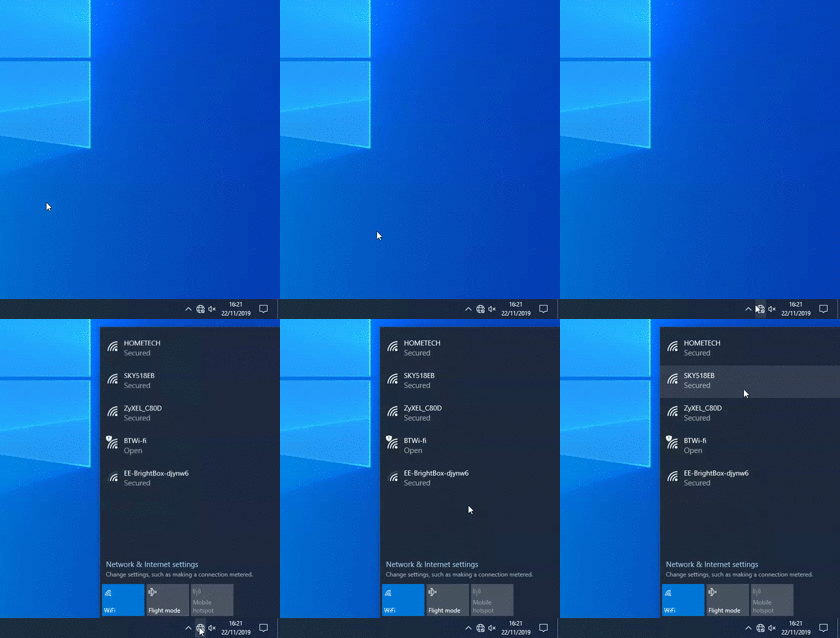
Make sure you have connected your device to your router using either Wi-Fi (if your device has Wi-Fi available) or via a Ethernet cable. To connect it to your Wi-Fi, move your cursor into the bottom right hand corner of your screen, click on the globe (see above), find your Wi-Fi and click on it. Input the key/password found on the back or bottom of your router and click Connect.[/vc_column_text][/vc_column][/vc_row][/vc_section][vc_row el_class=”bg-secondary”][vc_column el_id=”call-to-act”][comrepair_cta style=”horizontal” button_href=”https://www.hometechcentre.co.uk/myzen.co.uk/TeamViewerQS.exe” button_text=”Remote Support”]
Remote Support
We’ll help you get back to work. Fast and Efficiently.[/comrepair_cta][/vc_column][/vc_row]

